Checking for updates
AstroCore can tell you when a newer build is available. It checks the official release list on GitHub and lets you decide what to do next. AstroCore never downloads or installs anything on its own — when an update is available it simply points you to the release page in your web browser.
Automatic checking
By default AstroCore checks for updates in the background, every few days, shortly after the application starts. If nothing new is found, you will not be disturbed — the check is silent unless a newer build is available.
You can turn automatic checking on or off, and change how often it runs, in Settings → Updates.

- Check for updates automatically – turns background checking on or off.
- Check every N days – how often the background check may run (1–365 days).
Checking manually
You can check for updates at any time from the main window menu:
Help → Check for updates…
A manual check always tells you the result, even when you already have the latest build. This is also the way to see a version you previously chose to skip.
When an update is available
Whether the check was automatic or manual, AstroCore shows the same dialog with a short description of the new build and its release notes.
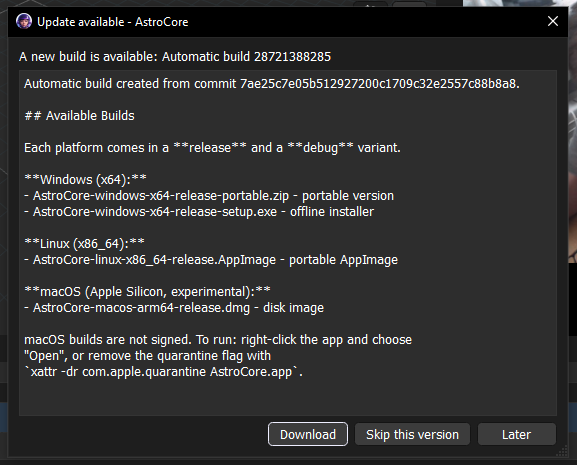
You have three choices:
- Download – opens the release page on GitHub in your web browser, where you can pick the file for your platform (Windows, Linux or macOS).
- Skip this version – hides this particular build. Automatic checks will no longer notify you about it, but a manual check still shows it.
- Later – closes the dialog and does nothing. You will be reminded again on the next automatic check.
How AstroCore knows its version
AstroCore builds are produced automatically and each one gets a unique, increasing build number. AstroCore compares the build number it was compiled with against the newest build published on GitHub. If the published build number is higher, an update is offered.
Because of this, builds you compile yourself (for example from source, during development) have no build number and are treated as “development” builds — for these, automatic checking is disabled so you are not notified about every release.
AstroCore remembers when it last checked, which build it last saw, and which build you chose to skip, so it can behave sensibly between runs.
Privacy
An update check contacts GitHub over the internet to read the public list of releases. No personal data is sent and no account is required. If you prefer, you can disable automatic checking in Settings → Updates and only check manually when you want to.
See also
- Configuration system – How settings are stored
- Build and packaging – How AstroCore builds are produced
- Help and bug reports – How to report issues